

Why Your LinkedIn Analytics Are Lying to You (And What Brands Actually Pay For)
A creator's guide to the metrics that matter and the ones that just look good...

Hey babe 👋

Before we dive in: This newsletter is brought to you by Rebrandly - the link management platform I use to track every click, prove ROI to brand partners, and build the performance case studies that help me close premium deals. More on how I use it below, but if you’re serious about turning your LinkedIn presence into actual revenue, this is the infrastructure piece nobody talks about. Check them out here.
So LinkedIn tells me my last post got 47,000 impressions.
Cool.
Wanna know how many people actually clicked the link in my post?
That’s a 0.66% click-through rate.
And out of those 312 clicks? Only 89 signed up for my newsletter. Only 23 booked a call. Only 4 became paying clients.
But here’s what’s wild: When I pitch brands, they don’t ask about my 47K impressions. They ask “how many people actually took action?”
And that’s the number most creators can’t answer.
Because LinkedIn analytics are designed to make you feel good about your content. Not to help you run a business.
Let me show you where the platform is lying to you (and what to track instead if you actually want to make money).
I’ve created this for YOU 💛
In this PDF guide I teach you which LinkedIn metrics actually matter and how to track them: Get It Here for FREE.
The 3 LinkedIn Metrics That Are Not Really Telling The Entire Truth:
1. Impressions LinkedIn counts an impression if your post showed up in someone’s feed for 0.3 seconds while they scrolled past it.
Brands don’t pay for “showed up in a feed.”
They pay for “got someone to stop, click, and convert.”
2. Engagement rate LinkedIn’s engagement rate = (reactions + comments + shares) / impressions
Notice what’s missing? Clicks.
You can have a 10% engagement rate and zero clicks. Which means zero traffic. Which means zero conversions. Which means zero ROI for a brand partner.
3. Follower count I’ve seen creators with 100K followers get worse partnership results than creators with 8K followers.
Why? Because follower count doesn’t tell you:
How many are active
How many are in the target audience
How many actually click through to offers
Brands are getting smarter. They’re asking for link click data, conversion rates, and off-platform behavior.
If you can’t show them that data, you’re leaving money on the table.
What Brands Actually Want to See:
I’ve closed some big partnership deals in the last 18 months. And every single negotiation came down to one thing: Proof that my audience takes action.
Here’s the data I show in every partnership pitch:
✨ Link click-through rates by content type
My carousels average
My text posts average
My videos average
✨ Conversion rates by traffic source
LinkedIn → newsletter
LinkedIn → sales page
LinkedIn → partner offer
✨ Audience behavior patterns
When do most of the clicks happen? In the first 3 hours, 6 hours, 10 hours?
This is the data that makes brands say “yes” at premium rates.
But here’s the problem: LinkedIn doesn’t give you any of this.
How I Actually Track What Matters (The Infrastructure Brands Respect)
Okay so if LinkedIn analytics are useless for partnership conversations, how do you get the real data?
You need to track off-platform behavior.
Here’s my actual system:
Step 1: Every link I share gets a unique tracking URL
Newsletter signup links
Partnership landing pages
Lead magnets
Booking calendars
Affiliate offers
I don’t use generic short links anymore (bit.ly makes you look like a hobbyist tbh).
I use custom branded links through Rebrandly because:
They look professional in posts (go.melissagaglione.com vs bit.ly/3x7kQ2m 👀)
I can track every click by campaign, platform, and time period
I can edit the destination URL without breaking the link (huge when you’re split-testing landing pages)
I get click data that LinkedIn will never show me
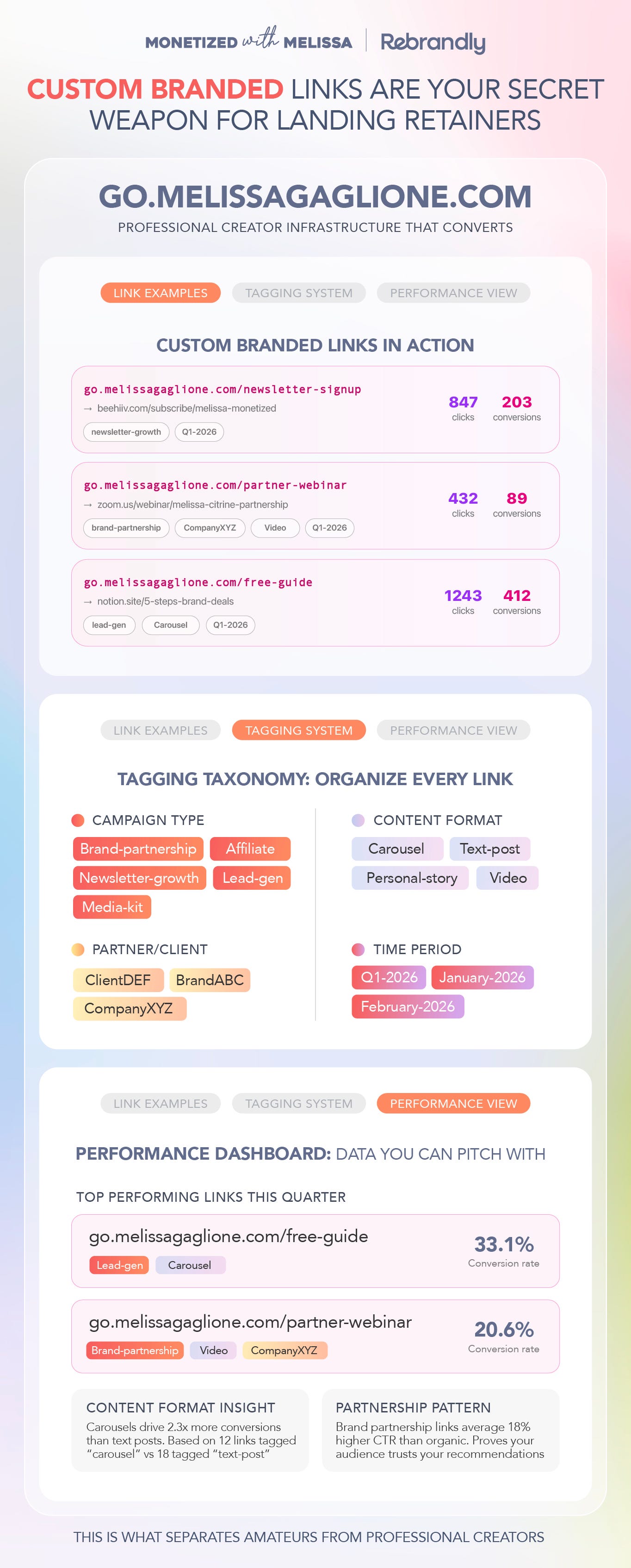
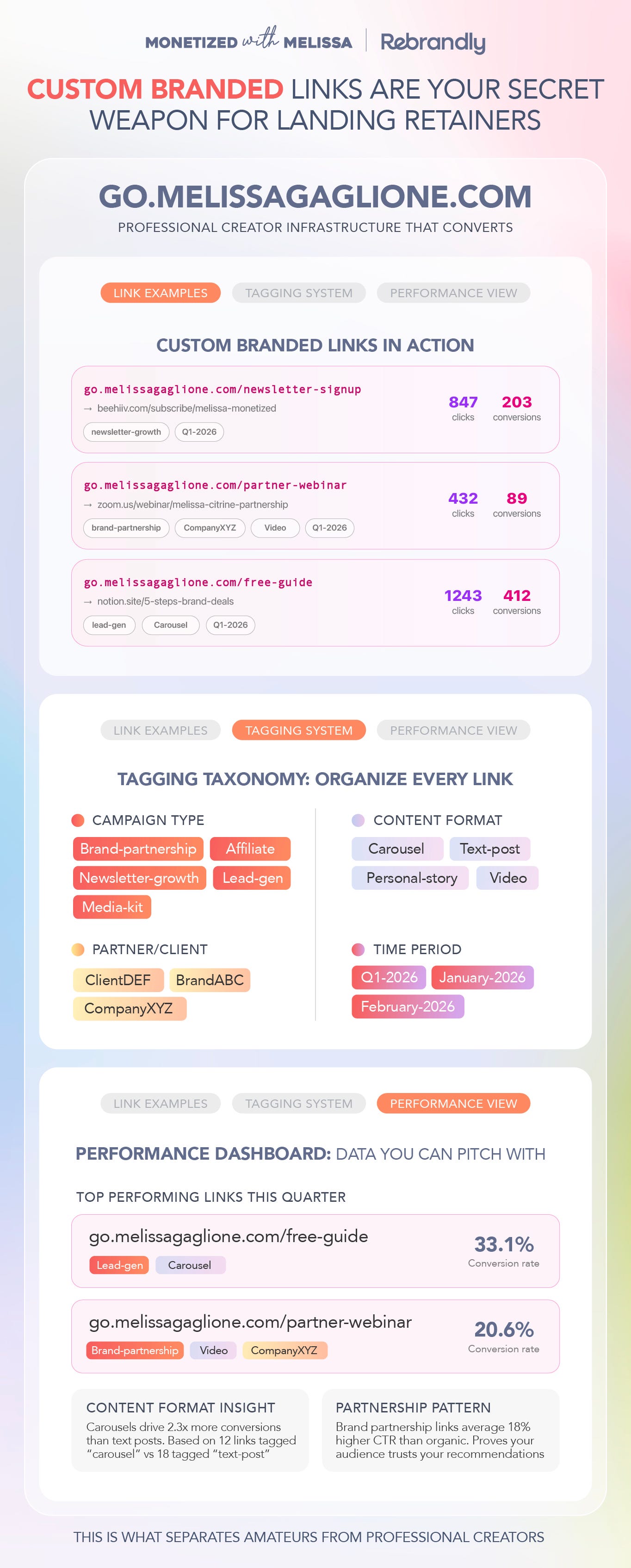
Step 2: I organize every link by campaign type
I tag all my links so I can see performance patterns:
Brand partnership content
Newsletter growth content
Lead gen content
Affiliate content
This lets me tell a brand: “Here’s how my last 3 partnership posts performed compared to my organic content. Here’s the CTR. Here’s the conversion rate. Here’s why your offer is a fit.”
Step 3: I build performance case studies
After every brand partnership, I create a 1-page performance summary:
Total impressions (from LinkedIn)
Total link clicks (from my tracking)
Conversion rate
Cost per acquisition
Audience sentiment (based on comments)
I send this to the brand. And then I use it in my next pitch to a different brand.
This is how you prove ROI. This is how you raise your rates. This is how you go from “influencer” to “strategic partner.”
The Shift That Changed Everything for Me ✨
I used to think my job was to create great content.
And yeah, that matters.
But the creators making real money? They’re not just creating content. They’re running data-informed creator businesses.
They know:
Which content types drive clicks (not just likes)
Which partnerships convert (not just align)
Which platforms send quality traffic (not just volume)
And they can prove it with numbers.
When you show up to a brand conversation with a performance deck that includes click-through rates, conversion data, and audience behavior patterns? You’re not competing with other creators anymore.
You’re positioning yourself as a marketing channel with measurable ROI.
That’s when brands stop negotiating rates and start asking “how do we lock you in for a retainer?”
Here’s What to Do Right Now ✨
If you’re serious about landing brand partnerships (or raising your rates on current partnerships), you need to start tracking off-platform behavior today.
Here’s your action plan:
1. Audit your current tracking setup
Are you using trackable links in every post?
Can you see click data by campaign?
Do you know your conversion rates?
2. Set up professional link infrastructure
Get a custom domain for your links (I use go.melissagaglione.com)
Organize your links by campaign type so you can spot patterns
Start building a historical performance database
3. Create your first performance case study
Pick your last partnership post (or high-performing organic post)
Pull the click data and conversion data
Build a 1-page summary showing the full funnel
This is the difference between “I got 10K likes” and “I drove 247 qualified clicks with a 12% conversion rate.”
Brands pay for the second one.
Want a head start? I’m using Rebrandly to manage all my links, track campaign performance, and build the case studies that help me close premium partnerships. They’ve got a free plan to get started, and it’s the same infrastructure powering my 6-figure creator business. (Seriously, this is the behind-the-scenes tool nobody talks about but everyone needs.)
Stop trusting LinkedIn’s vanity metrics. Start tracking what actually makes you money.
Talk soon, Melissa ✨
P.S. If you landed a brand deal but have no idea how to track its performance, reply to this email. Let’s fix that before your next pitch.